
IM.Umbraco.AI.Local · Umbraco 17
Local AI in the Umbraco backoffice
A Local LLM provider for Umbraco AI. Prompts, agents, Copilot and embeddings run on a model on your own server, with no cloud account.
Use cases
What you can do with a local model
01 Meta descriptions and summaries
A prompt reads the page and proposes an SEO description or a short summary. The editor chooses, edits and saves. Nothing is published without a person.
02 Rewrite and translate drafts
Shorten a paragraph, change the tone or prepare a first translation for the editor to check, right next to the field.
03 Copilot for editors
Editors ask about their content in the backoffice and get answers from the model on your server.
04 Agents with backoffice tools
Agents call tools to find and prepare content. Tool calls work with Ollama because the package rewrites their schemas.
05 Search by meaning
Embeddings from your own model can power semantic search and related-content lists. The search itself is built in your site.
06 Content that must stay inside
Intranets, member areas and regulated sectors: prompts and page content never leave your infrastructure.
Any OpenAI-compatible server you run
Cloud AI services and local servers differ
Both speak the same OpenAI-compatible API, but they do not behave the same way. This is general background on how the two kinds of service work, not something specific to one site.
01
A cloud AI service
OpenAI, Anthropic, Google and similar. The built-in providers in Umbraco AI are written for these.
- Access needs the vendor's API key, checked by the vendor
- A fixed list of the vendor's own models
- Accepts strict tool schemas and several system messages in one request
02
A server you run
Ollama, LM Studio, vLLM or a gateway such as LiteLLM, on your own hardware or network.
- The server URL is often enough; a key is optional
- Serves whichever models you have loaded
- Many chat templates reject strict tool schemas or more than one system message
What IM.Umbraco.AI.Local adjusts
- Connects with a URL alone and treats the API key as optional.
- Shows every model the server returns, for chat and embeddings.
- Rewrites tool-call schemas into a form local servers accept.
- Merges system messages into one, at the start of the conversation.
Install, connect, use
Install
- Add the NuGet package to your Umbraco 17 site.
- Umbraco finds the provider automatically.
- No changes in Program.cs.
Connect
- In the AI section, add a Local LLM connection.
- Enter your server URL, for example http://localhost:11434/v1 for Ollama.
- Add an API key if your server needs one.
Use
- Create profiles for chat and embeddings.
- Add prompts to the fields your editors use.
- Turn on Copilot or agents when you are ready.
dotnet add package IM.Umbraco.AI.LocalOn our own site
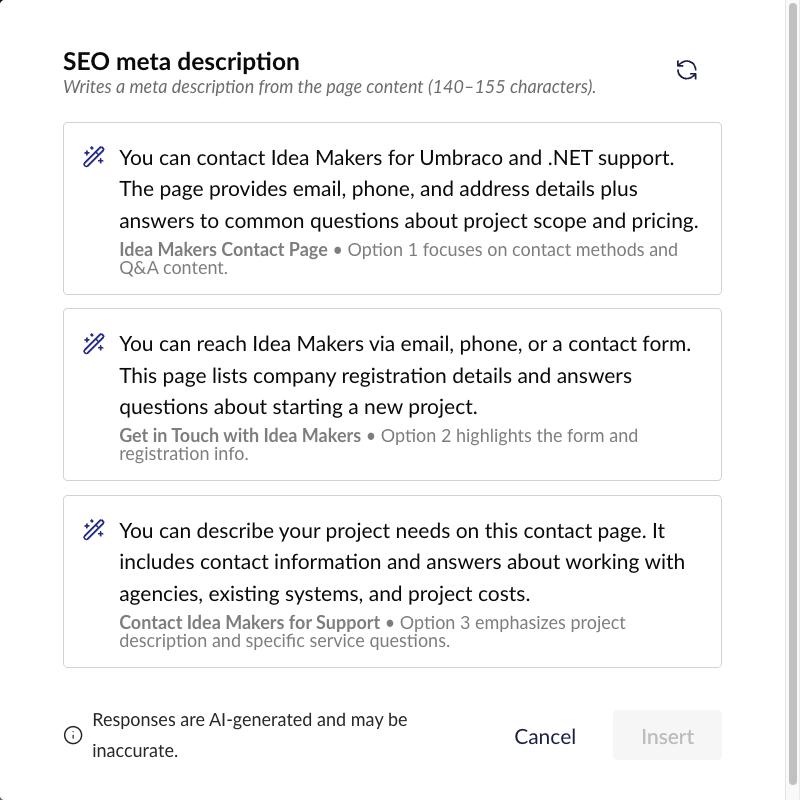
01 · Prompt on the SEO description field
SEO meta description
The prompt reads the page and proposes three descriptions of 140 to 155 characters, in the language of the page. The editor picks one, edits it if needed and saves.
02 · Prompt on excerpt and description fields
Page summary
Two short summaries for listings, excerpts and leads, written by the same local model from the content of the page.
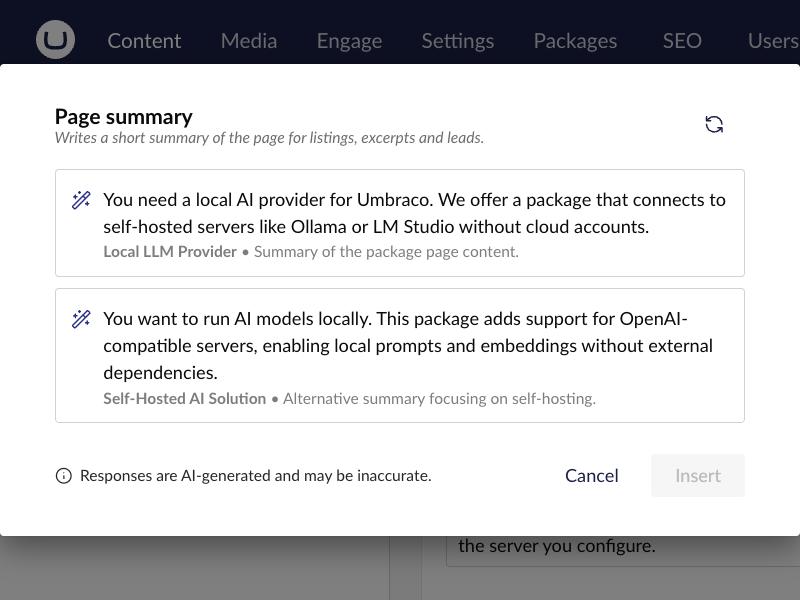
Screenshots from the ideamakers.pl backoffice on Umbraco 17.8. Both prompts run on a Qwen model on our own server, connected through IM.Umbraco.AI.Local.
Questions, bugs and ideas
Want AI in your backoffice, on your own server?
We can set up the model server, the connection and the prompts with your team. You do not need a ready specification.